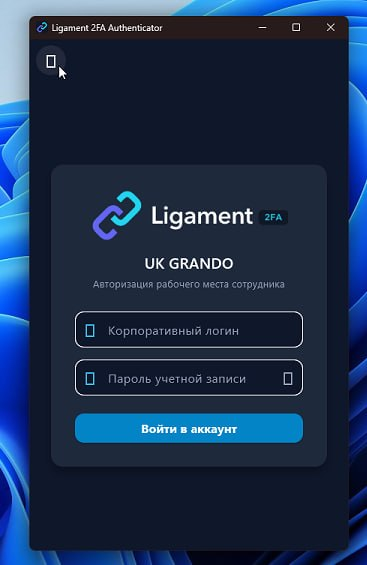
🛡️ 100% On-Premise Self-Hosted • Zero Cloud • Air-Gapped Ready

Unified Enterprise 2FA/MFA Without Foreign Cloud Lock-In

Protect Windows Logon, RDP, RADIUS VPN/Wi-Fi, and Web SSO in a single Docker container. Instant 0.4s approval via push number matching — zero SMS or manual code typing.

bash — docker quickstart
$ docker run -d --name ligament -p 8443:8443 -p 1812:1812/udp -v ./data:/data aligorov/ligament_2fa:latest
🚀 Upcoming modules: Link, Link Recorder, PACS & Bolid Fire →
Рабочая станция • Windows 11 / Server RDP
АС
Alex Smith
corp\a.smith (RDP Session)
Security Match Code
42
Waiting for smartphone approval...
Tap number 42 on your phone
🛡️ Ligament 2FA Now
Windows RDP Sign-in
ПК: WS-CORP-042 • IP: 192.168.1.10
Select the matching number:
Tap 42 for instant unlock
0.4s
Approval Latency
1-tap number matching
100% On-Prem
Data Sovereignty
Zero data leaves your perimeter
$0 / Free
Free Tier Forever
Up to 5 users with base features
up to 85%
TCO Cost Reduction
Versus foreign SaaS subscriptions

How a connection travels

Choose a scenario to see its route, second factor and behavior during a connectivity outage.

    Online routeCached Wi-Fi backup
    100%

    Arrows show request or connection initiation; responses use the same channel. MFA factors are alternatives, not a required sequence.

    Scroll horizontally or adjust the zoom ↔

    Branch Wi-FiAccess points • 802.1X
    Local RelayBackup RADIUS • cached authentication
    Ligament Core and Relay topologyIngress services on the left, Core in the center, factors and hosts on the right. Branch Wi-Fi, Relay and branch hosts are at the bottom. Select a node for details. INGRESS SERVICESFACTORS / TARGET HOSTS LDAPS RADIUS OIDC / SAML RDP / SSH + 2FA HTTPS :443 HTTPS / WSS :443 RDP / SSH WSS :443 RDP / SSH RADIUS Windows Logon / UACCredential Provider → Core / AD VPN / office Wi-FiRADIUS • 802.1X Web SSOOIDC / SAML • Core only Bastion RDP / SSHConnection with 2FA Active Directory / FreeIPACore → LDAPS LIGAMENT CORESSO • policies • auditOn-Premise • MFA • Bastion Mobile appHTTPS / WSS :443 Telegram / eXpressMFA approval FIDO2 / security keyAuthentication factors Host on the Core networkRDP :3389 / SSH :22 Branch RelayWSS :443 • backup RADIUSNo SSO / Windows Logon Branch hostsRDP :3389 / SSH :22 External portalHTTPS :443 • 2FA Branch Wi-Fi802.1X • local cache

    Full topology

    Select a scenario or a node.

    All connections

    External portal: HTTPS + 2FA. App → Core: HTTPS / WSS. Relay → Core: a separate outbound WSS tunnel for the branch.

    SSO and Windows Logon/UAC do not go through Relay. During a complete WAN outage cached Wi-Fi authentication stays local; the remote RDP/SSH tunnel to Core is unavailable.

    Why Traditional MFA Solutions Fall Short

    Examine the real risks of foreign clouds, the friction of free TOTP apps, and the resilience of On-Premise Ligament.

    Vulnerability #1

    Foreign Clouds (Duo, Okta)

    • Sanctions & Lockout: Risk of sudden tenant suspension and immediate loss of access.
    • Foreign Sovereignty: Regulatory non-compliance. Sensitive identity data leaves your private network.
    • WAN Single Point of Failure: Fiber cut or ISP outage paralyzes local workstation sign-ins.
    • Expensive SaaS Subscriptions: $6 to $15 per user monthly in foreign currency with compounding costs.
    Vulnerability #2

    Free Google Auth / Generic TOTP

    • No Windows Protection: Cannot natively protect Windows LogonUI, RDP, or UAC admin escalation.
    • User Fatigue & Friction: Retyping 6-digit codes 30 times daily wastes time and frustrates employees.
    • Phishing Vulnerability: Static 6-digit TOTP codes are easily captured via real-time reverse proxies.
    • Zero Central Revocation: Impossible to centrally revoke or audit offline software authenticators.
    The Winning Choice

    Ligament 2FA (On-Premise)

    • 100% On-Premise: Single Docker container on your servers. Zero external cloud dependencies.
    • Autonomous Branch Relay: Remote branches & factories authenticate locally even during complete WAN cut.
    • 0.4s Auto-Logon: Number matching on login screen: 1 tap approves and unlocks Windows without click.
    • Honest Pricing: Community free for up to 5 users; Base $1/month, Business $2.50/month or perpetual Base $15 per user.

    Engineered for Critical Enterprise Roles

    Security that satisfies CISOs, saves capital for CFOs, and eliminates user friction.

    🛡️

    Chief Information Security Officer (CISO)

    Full data sovereignty. Complete compliance with enterprise security baselines and immutable audit logs.

    • 100% On-Premise: encryption keys never touch external clouds
    • Anti-push bombing defense: mandatory Number Matching
    • Device Posture verification (BitLocker, Defender, Firewall)
    • Seamless SIEM integration with immutable audit logs
    💼

    CIO & Chief Financial Officer (CFO)

    Reduce 5-year Total Cost of Ownership (TCO) by up to 85% compared to foreign SaaS providers.

    • Perpetual lifetime licensing: one-time investment (CAPEX)
    • $1,500 one-time for 100 users vs $7,200/yr with Cisco Duo
    • 1 year of updates included; later update renewals are separate
    • Immunity against sanctions, currency inflation, and license cancelation
    • Forever free tier for up to 5 users with base features
    ⚙️

    SysAdmins & DevOps Engineers

    Deployment in 2 minutes without complex clusters. Ready GPO ADMX templates and silent MSI rollouts.

    • One-command deployment: docker run ... in under 120 seconds
    • Direct Active Directory & FreeIPA synchronization over LDAPS
    • Packaged ADMX policies and silent MSI rollout via Active Directory GPO
    • Autonomous Branch Relay keeping remote sites online during WAN cuts

    Engineered by Infrastructure Specialists

    Zero external telemetry, clean code, transparent architecture, and direct technical engineering support.

    Interactive Perimeter Modules

    Switch between the primary protection vectors of your enterprise perimeter.

    Windows Auto-Logon

    Вход на рабочий стол без повторного клика и нажатия Enter сразу после подтверждения на телефоне.

    LogonUIWindows 10/110.4s

    Number Matching

    На экране входа отображается проверочное число. Защищает от push-бомбинга и случайных нажатий.

    Anti-bombingSecurity

    UAC Elevation 2FA

    Запрос второго фактора на телефон администратора при попытке запуска программ с правами администратора.

    UACAdmin Guard

    RADIUS Push Holding (RFC 5080)

    Сервер удерживает UDP-сессию на время подтверждения вторым фактором, предотвращая повторные запросы.

    RFC 5080UDP

    Корпоративный Wi-Fi 802.1X

    Бесшовный доступ к корпоративному Wi-Fi WPA2/WPA3-Enterprise с аутентификацией пользователей.

    WPA2/WPA3EAP-TTLS

    VPN-шлюзы

    Совместимость с MikroTik RouterOS, Cisco ASA, Fortinet, UniFi, WireGuard и OpenVPN.

    MikroTikCiscoFortinet

    OIDC & SAML 2.0 — Core only

    Central Web SSO for corporate services such as Nextcloud, GitLab, Bitrix24 and 1C. OIDC/SAML 2.0 authentication runs strictly through Ligament Core; Branch Relay is not involved.

    OIDCSAML 2.0Core only

    RDP / SSH Bastion with 2FA

    Forward RDP and SSH through Ligament Core or a branch Relay to the target host with 2FA confirmation. Provides protected remote access to workstations and servers.

    BastionZero Exposed Ports

    Reverse Proxy with 2FA

    Protect legacy web panels and internal systems through the central Core without changing their source code.

    ProxyLegacy 2FA

    Secure RDP & SSH forwarding

    The Relay opens an outbound WSS :443 tunnel to Core, forwarding RDP :3389 and SSH :22 to internal branch hosts without a public IP or exposed ports.

    RDP :3389SSH :22WSS :443

    Backup RADIUS for branch Wi-Fi

    During a WAN or fiber cut, the local Relay serves cached 802.1X WPA2/WPA3 Enterprise Wi-Fi authentication autonomously.

    Wi-Fi 802.1XWPA2/WPA3WAN cut survival

    Audit synchronization

    RDP/SSH forwarding and Wi-Fi events are buffered locally and replicated to Core after connectivity returns. Relay does not handle Web SSO or Windows Logon.

    Audit SyncCore replication
    Roadmap · Coming soon

    Upcoming Modules: Link, Link Recorder, PACS & Bolid

    Architecting unified on-premise Ligament Link, Link Recorder session archive with AI forensics, PACS turnstiles with Anti-Passback, and Bolid fire evacuation zone mapping.

    Native Windows Logon with Ligament 2FA

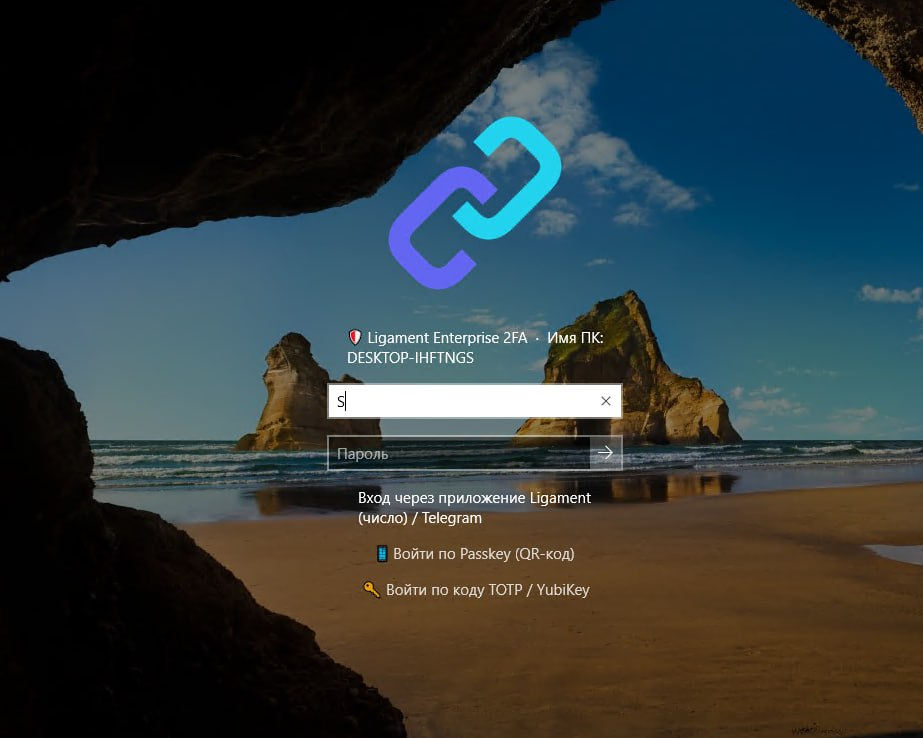
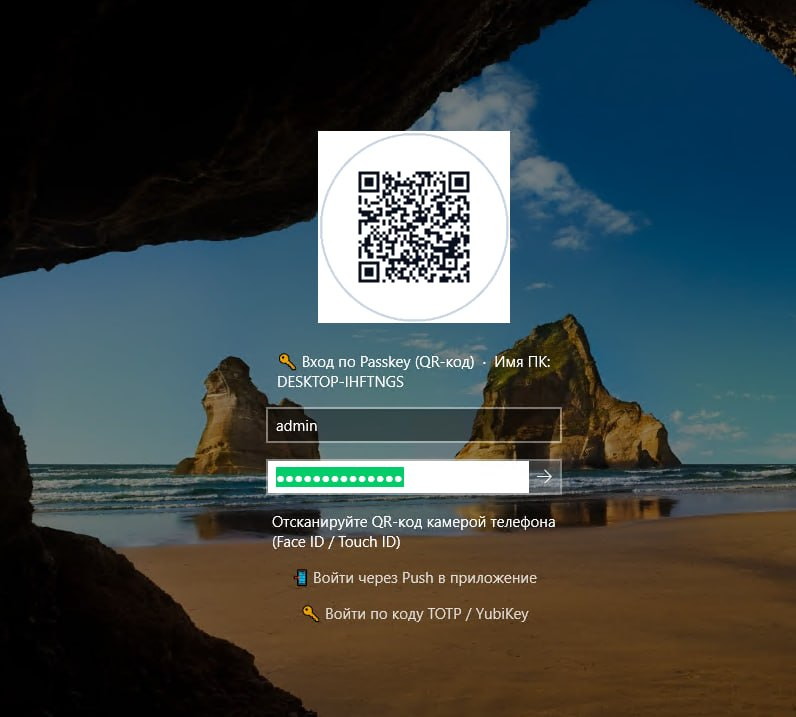
    Workstation and RDP authentication: native LogonUI tile, instant Auto-Logon, Passkey verification via QR code and desktop companion client.
    Download Ligament 2FA

    The latest stable release v1.1.73 is published in GitHub Releases. Choose your platform.

    ▣

    Windows

    Ligament 2FA client for Windows x64.

    Download MSI
    ▤

    Linux

    DEB, RPM and universal TAR.GZ packages for x86_64.

    Choose package
    ◆

    Android

    APK signed with the official release key.

    Download APK
    ●

    iOS

    iOS application package from the release.

    Download IPA

    Open all versions and checksums on GitHub →

    Transparent Pricing Without Hidden Fees

    Base — $1, Business with SSO — $2.50 per user/month. Annual billing gives 13 months of access. Perpetual Base — $15 per user one-time.

    50 users

    Paid licenses: minimum 20 users. Select 5 users for free Community.

    Additional modules

    One-time per organization. Notify is included in the base. Business also includes Trust, SSO, Bastion and basic SIEM event forwarding.

    Selected configuration cost
    $125 / month
    Business: 50 users × $2.50/month

    Base and Business subscriptions: minimum 20 users; pay for 12 months and get the 13th free. Updates are included during the paid term. Business includes Trust, SSO, Bastion and basic SIEM event forwarding. Perpetual Base and separately purchased modules include 1 year of updates; optional annual update renewal is 20% of their license prices. The acquired version keeps working without renewal. Modules are purchased once, Relay per node. Support and deployment are separate.

    Community

    Free base protection for up to 5 users: a second factor for Windows logon and UAC elevation, VPN and Wi-Fi authentication through RADIUS, and basic Notify notifications.

    $0
    Free Forever
    • Up to 5 active users
    • Full Windows Logon & RDP
    • RADIUS Wi-Fi & VPN Server
    • Notify included; modules extra
    • Community support
    Start free

    Base

    Subscription for Windows Logon/UAC, RADIUS VPN/Wi-Fi and Notify.

    $1
    per user per month
    • Minimum 20 users — $20/month
    • $12 for 13 months with annual billing
    • Updates during subscription
    • Modules and contracted Support billed separately
    Choose plan

    Business

    Base + SSO, Trust, Bastion and basic SIEM event forwarding. RDP/SSH access through Core or Relay to the host with 2FA.

    $2.50
    per user per month
    • Minimum 20 users — $50/month
    • $30 for 13 months with annual billing
    • Updates during subscription
    • Relay, PACS and SIEM Advanced billed separately
    • Deployment and SLA by separate agreement
    Choose plan

    Perpetual (Lifetime)

    Base license for each protected user: Windows Logon/UAC, RADIUS for VPN and Wi-Fi, and Notify notifications. Purchased once, with a perpetual right to use the acquired version.

    $15
    per user one-time
    • Minimum 20 licenses — $300
    • Zero recurring monthly fees
    • Total infrastructure sovereignty
    • 1 year of updates included
    • Optional updates after year one — 20% per year
    • Contractual price guarantee
    Buy perpetual

    Organization modules — separate from user licenses

    Notify

    Included
    in the base user license
    Details

    Basic authentication event notifications help you follow user sign-ins and access. Included in the base license at no extra charge.

    Branch Relay

    $500
    per branch node one-time
    Details

    A branch node that opens an outbound WSS tunnel to Core and forwards RDP/SSH connections to internal hosts without a public IP. During WAN outages it maintains local Wi-Fi authentication through cached backup RADIUS. Each node requires its own license.

    • RDP :3389 and SSH :22 forwarding
    • Outbound WSS :443 tunnel without a public IP
    • Backup RADIUS for branch Wi-Fi
    • 802.1X Wi-Fi authentication during WAN cuts
    • Automatic audit replication to Core
    Add Relay

    Trust

    $500
    per organization one-time
    Details

    Device posture checks for access decisions: BitLocker, Microsoft Defender and the firewall. Helps consider workstation security alongside verification of the user’s identity.

    • Perpetual module license
    • 1 year of updates; then optional 20%/year
    Request module

    SSO

    $750
    per organization one-time
    Details

    Single sign-on to corporate web applications using OpenID Connect and SAML 2.0 with MFA. Users authenticate through Ligament Core; Branch Relay does not handle Web SSO.

    • Perpetual module license
    • 1 year of updates; then optional 20%/year
    Request module

    Bastion

    $1,000
    per organization one-time
    Details

    Forward RDP and SSH through Ligament Core or a branch Relay to the target host with 2FA confirmation. Provides protected remote access to workstations and servers.

    • Perpetual module license
    • 1 year of updates; then optional 20%/year
    Request module

    SIEM Advanced

    $2,000
    per organization one-time
    Details

    Advanced SIEM integration with an agreed scope. Basic event forwarding is included in Business and does not require the separate Advanced license.

    • Perpetual module license
    • 1 year of updates; then optional 20%/year
    Request module

    PACS

    $1,000
    per organization one-time
    Details

    Integrates Ligament with a physical access control system. Connects user identity verification with access to premises; compatibility with a specific system is determined during deployment.

    • Perpetual module license
    • 1 year of updates; then optional 20%/year
    Request module

    Support

    from $500
    per organization per year
    Details

    Support service: scope, response times and SLA agreed in contract. Deployment quoted separately.

    Discuss support

    Detailed Solution Comparison

    Feature-by-feature evaluation of enterprise authentication approaches.

    Swipe or scroll right to compare all solutions ↔

    Feature / Parameter Cisco Duo / Okta Google Auth / TOTP Ligament 2FA
    100% On-Premise (No Cloud)✕ (SaaS Cloud Only)✓ (Local)✓ 100% On-Premise in Docker
    Windows Logon & UAC Protection✓ (Complex Setup)✕ (No Support)✓ Native LogonUI Credential Provider
    0.4s Auto-Logon✕ (Manual click required)✕ (Retype 6-digit code)✓ 0.4s Instant Auto-Logon
    Branch Relay: RDP/SSH + Wi-Fi RADIUS✕ (Requires public IP / fails on WAN)✕ (No forwarding or sync)✓ WSS :443 forwarding + cached 802.1X Wi-Fi
    Anti-Push Bombing DefenseLimited✕ (Vulnerable to phishing)✓ Mandatory Number Matching
    Telegram & eXpress Bots✕ (No)✕ (No)✓ Zero App Installation Required
    Cost for 100 Users$7,200+ every year$0 (Zero management)Business: $3,000 for 13 months; perpetual Base: $1,500 one-time, modules extra

    Deploy in 3 Simple Steps

    From initial docker container launch to protecting domain workstations in under 15 minutes.

    1

    1. Launch Docker Container

    Spin up the container with a single command. Web administration and identity store are packaged inside.

    2

    2. Connect Active Directory

    Specify your domain controller or FreeIPA endpoint. Users and groups are mapped via LDAPS in 5 minutes.

    3

    3. Deploy MSI via Group Policy

    Create a standard Active Directory GPO with ADMX templates for silent background workstation enrollment.

    📖 Full Deployment & Setup Guide (Docs)

    Frequently Asked Questions

    Clear technical and business answers to frequent inquiries.

    What happens if the internet goes down or connection to the central server is cut?
    Branch Relay has exactly two responsibilities: it forwards internal RDP (:3389) and SSH (:22) through an outbound WSS (:443) tunnel to Core without a public IP or exposed ports, and it provides cached 802.1X WPA2/WPA3 Enterprise Wi-Fi RADIUS during WAN outages. Web SSO (OIDC/SAML) and Windows Logon/UAC remain Core and workstation Credential Provider functions; Relay is not involved.
    Are employees forced to install a dedicated mobile app on their personal phones?
    No. Ligament supports approvals directly through Telegram or eXpress enterprise bots, hardware FIDO2/Passkey tokens (YubiKey), or generic TOTP authenticators.
    How does Windows Auto-Logon work and is it secure?
    It is secured with mandatory Number Matching. The Windows login screen displays a verification number (e.g. 42) that the user confirms on their phone. Once verified, the desktop unlocks in 0.4 seconds without user typing, completely immune to push fatigue and replay attacks.
    Does the solution satisfy strict enterprise data sovereignty and compliance?
    Yes. Ligament runs 100% On-Premise inside your private network. Credentials, session states, and audit logs never leave your servers, fulfilling strict corporate sovereignty requirements.
    How does upgrading from the 5 free users to a commercial license work?
    The free Community tier (up to 5 users) is free forever with base features; modules extra. When expanding, simply apply a license key in the admin UI without reinstalling or interrupting users.

    Secure Your Enterprise Perimeter Today

    Deploy the free version for up to 5 users in 2 minutes or request a full 30-day evaluation license for your organization.